Warehouse, production, label, stock and asset software that works with the barcode printers, scanners and mobile computers we supply, plus ready-to-install apps.
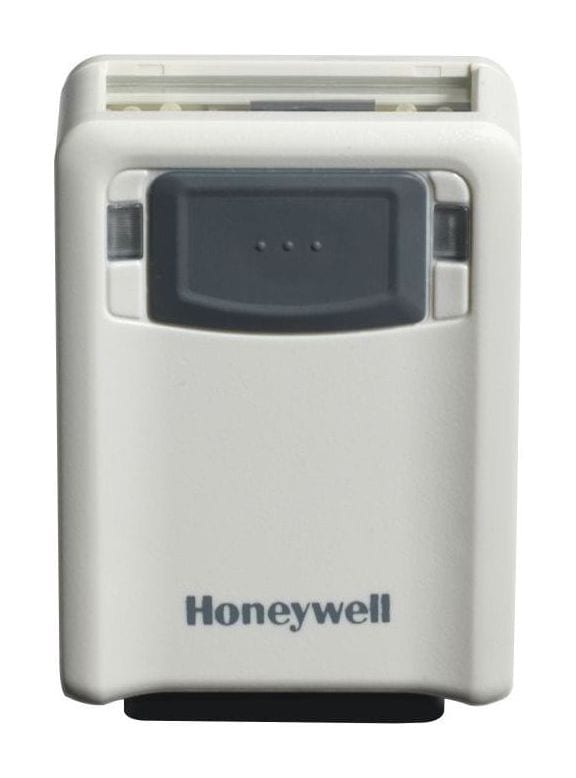
A palm-sized corded 1D/2D scanner (73 × 51 × 26 mm, 77 g) that mounts in a kiosk, under a counter or beside a line, scans hands-free when it sees a code, and reads codes on phone screens.
Vuquest 3320g price in India: ask our team for today's competitive price. Share your requirement and budget, and we will help you choose the right configuration and send a written quotation with current pricing and delivery time.
Covered by the manufacturer's warranty. The warranty period, terms and conditions are as declared by Honeywell.
A small scanner that fits where a handheld will not
The Vuquest 3320g is Honeywell's compact hands-free area-imaging scanner. It is small enough to build into a kiosk, a counter or a packing station, and it can also be picked up and used by hand with its thumb button.
Fits inside a kiosk or under a counter
At 73 × 51 × 26 mm and 77 g, the 3320g fits in a kiosk, a self-service terminal or a packing bench. Honeywell designs it for universal mounting, so it can sit in a fixed position and scan whatever is held in front of it.
Hands-free, or in the hand when needed
In presentation mode it scans as soon as it sees a barcode, so staff keep both hands on the item. For a bulky item, pick it up and press the thumb-activated button, which Honeywell sets as the default manual trigger.
Reads codes on phone screens
Honeywell built it to read barcodes on highly reflective surfaces such as mobile phone screens, and its Mobile Phone Read Mode works both hands-free and in the hand, for tickets, coupons and payment codes.
Works with your machine's own triggers
Through its external I/O, the 3320g can trigger an external beeper, photo eye or illumination, so it can work on an unattended line or a conveyor. This needs Honeywell's External Input Output licence and an External IO cable, which we include in the quotation when you need them.
One scanner, three host connections
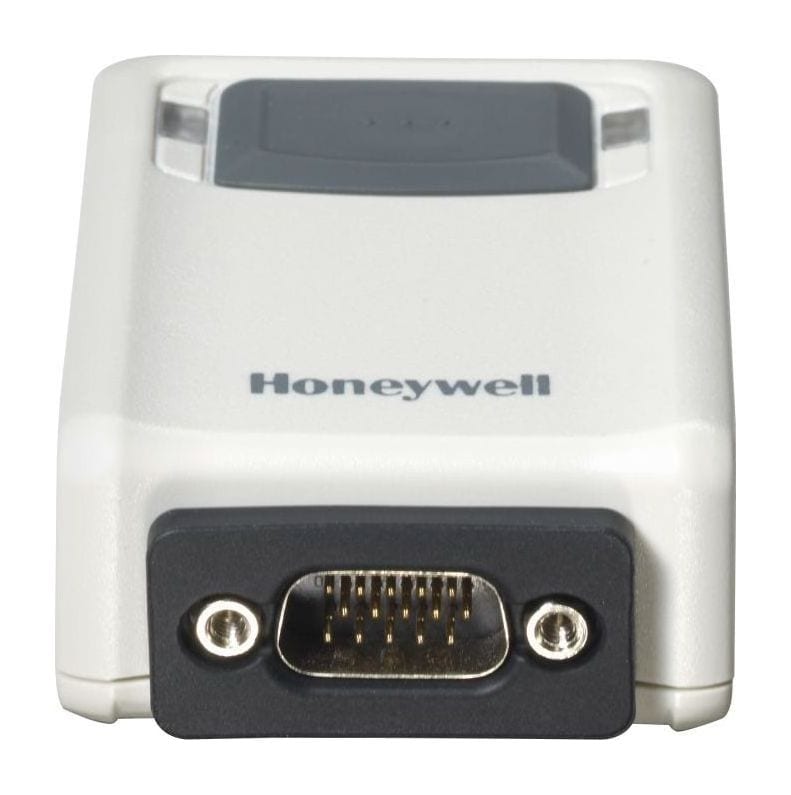
It connects over USB, RS-232 or keyboard wedge, with automatic interface detection, through a 15-pin D-Sub connector on the scanner. We set it up for your billing, POS or line software.
Sealed to IP53, built for 1.5 m drops
Honeywell seals it to IP53, designs it for 1.5 m drops and rates it to work from -20 °C to 50 °C, in 5% to 95% humidity, non-condensing.
Used in
Retail billing and checkout
Self-service kiosks
Logistics and warehouses
Transportation
Manufacturing
For buyers in India
Using the Vuquest 3320g in India
These are the points buyers in India ask us about the Vuquest 3320g. Mention the ones that apply to you when you request a quote.
Reads e-invoice and payment QR codes on paper and phones
Mount it at goods inward or a billing counter to read the QR code on a GST e-invoice or a code on a customer's phone. Honeywell rates it to read 2D codes as small as 6.7 mil Data Matrix; send us a sample if your codes are smaller.
Tell us the trigger before we quote a line or kiosk set-up
For a conveyor, a turnstile or a kiosk that should scan only when a sensor fires, the external trigger needs Honeywell's External Input Output licence and an External IO cable. Tell us how the scanner should start, and we quote the licence and cable with the scanner.
Rated -20 °C to 50 °C; keep kiosks out of direct sun
Keep an outdoor-facing kiosk window out of direct afternoon sun. Honeywell rates the 3320g to work from -20 °C to 50 °C and seals it to IP53.
Types into your billing screen like a keyboard
In USB keyboard mode the scanned code is typed into whichever field the cursor is in. If your software reads a COM port instead, Honeywell's USB serial mode needs Honeywell's driver on Windows; we install it during set-up.
Specifications
Honeywell Vuquest 3320g technical specifications
Honeywell Vuquest 3320g specifications
General
Model
Vuquest 3320g (Honeywell also calls it the Vuquest 3320g Area-Imaging Scanner)
Form factor
Compact hands-free (presentation) scanner; mountable, or hand-held with the thumb-activated button
Connection
Corded (no wireless, no battery)
Housing colours
Black, ivory and white; we confirm the colours available in India in the quotation
Trigger modes
Manual trigger (thumb button, default) and presentation mode (scans when it sees a barcode); Mobile Phone Read Mode for screens
Scanning
Scan pattern
Area image (838 × 640 pixel array)
Field of view
42.4° horizontal, 33° vertical
Motion tolerance
More than 270 cm/s (106 in/s) at the focal point
Focal point
127 mm (5 in)
Pitch, skew
±45°, ±65°
Print contrast
20% minimum reflectance difference
Aiming
Laser-free aiming beam
Symbologies
Standard 1D, PDF, 2D, postal and OCR; Honeywell notes decoding depends on the kit configuration, and OCR is a Honeywell licence
Minimum resolution
1D (Code 39): 5 mil (0.125 mm); 2D (Data Matrix): 6.7 mil (0.170 mm)
Light levels
0 to 100,000 lux
Typical decode ranges (Honeywell)
5 mil Code 39
55 to 159 mm
7.5 mil Code 39
35 to 239 mm
10 mil Code 39
26 to 330 mm
13 mil UPC-A
39 to 435 mm
6.7 mil PDF417
36 to 178 mm
10 mil Data Matrix
47 to 216 mm
Conditions
Honeywell notes performance may be affected by barcode quality and environmental conditions
Connectivity
Host interfaces
USB, RS-232 and keyboard wedge, with automatic interface detection
USB modes
USB keyboard, USB HID POS and USB serial (COM-port emulation; Windows needs Honeywell's driver)
Connector on the scanner
15-pin D-Sub
External I/O
Triggers an external beeper, photo eye or illumination; needs Honeywell's External Input Output licence and an External IO cable
Power
Input voltage
5 V DC ± 0.25 V
Operating power
2.3 W (450 mA at 5 V)
Standby power
0.45 W (90 mA at 5 V)
Physical and environment
Dimensions (L × W × H)
73 × 51 × 26 mm (2.9 × 2.0 × 1.0 in)
Weight
77 g (2.7 oz)
Operating temperature
-20 °C to 50 °C (-4 °F to 122 °F)
Storage temperature
-20 °C to 70 °C (-4 °F to 158 °F)
Humidity
5% to 95% relative humidity, non-condensing
Sealing
IP53
Drops
Designed to withstand 1.5 m (5 ft) drops
Software
Configuration
Honeywell EZConfig-Scanning, or the set-up barcodes in Honeywell's quick start guide (interface, keyboard country, prefix and suffix, data format editor)
On-scanner apps
Honeywell TotalFreedom: decoding and formatting plug-ins run on the scanner itself
Warranty
Warranty
Covered by the manufacturer's warranty. The warranty period, terms and conditions are as declared by Honeywell.
Optional accessories
Honeywell External IO cable, USB (black, Type A, 2.9 m, straight)
Honeywell External IO cable, RS-232 (black, DB9, 2.9 m, straight)
Honeywell External Input Output (EIO) licence for the Vuquest 33xx
Honeywell OCR licence for the Vuquest 33xx
Honeywell power supply
Tell us the host connection and how the scanner should be triggered; we quote the cable, licence and any power supply with the scanner and confirm the plug type in the quotation.
Specifications from Honeywell's published documents, last checked 14 October 2026.
Makers can change specifications without notice; we confirm the exact model and configuration in your written quotation.
About our product information
More detail
More about the Honeywell Vuquest 3320g
Honeywell describes the Vuquest 3320g as a compact area-imaging scanner that offers "aggressive scanning of all 1D, PDF and 2D barcodes in a lightweight, durable and portable form factor". Honeywell calls it ideal for retail environments, and it reads printed barcodes as well as digital barcodes on phones and other smart devices. We confirm in the quotation which codes your unit is set up to read.
What the Honeywell Vuquest 3320g is used for: billing counters, checkout lanes, supermarkets, retail stores and product labels.
Compare
Vuquest 3320g or another model?
Honeywell Vuquest 3320g compared with similar models
Kiosks, counters and lines that need a small scanner with external triggers
A retail checkout that scans goods held up to a stand-alone scanner
Exploring for a different use?
If your job differs from what the Vuquest 3320g is built for, this Honeywell model may fit it better:
Buyers who need a scanner that stands on a checkout counter, with an infrared trigger and a tilting head, often look at the
Honeywell Orbit HF680 (hands-free presentation scanner, USB and RS-232).
What is the price of the Honeywell Vuquest 3320g in India?
The Vuquest 3320g price depends on the cable or accessories you need and the quantity. Ask our team for today's competitive price: share your requirement and budget,
and we will help you choose the right configuration and send a written quotation with current pricing and
delivery time.
Which connections does the Vuquest 3320g support?
USB, RS-232 and keyboard wedge, through the 15-pin connector on the scanner; it detects the interface automatically. On USB it can work as a keyboard, as a USB HID POS device or as a virtual COM port. It has no Ethernet port and no wireless connection, so plan a cable run to the PC, POS or controller it serves.
Can it scan on a conveyor or in an unattended kiosk?
Yes, with the right set-up. In presentation mode it scans whenever a code comes into view. To start scanning from a sensor, or to drive a beeper or a light, its external I/O needs Honeywell's External Input Output licence and an External IO cable. Tell us the line speed and how the item is presented, and we confirm the set-up before we quote.
How far from the scanner can the barcode be?
It depends on the code size. Honeywell rates a 13 mil UPC-A from 39 to 435 mm and a 10 mil Data Matrix from 47 to 216 mm; smaller codes need to be closer. Place the scanner so the code passes within that range, and send us a sample label if your codes are small.
Vuquest 3320g or Orbit HF680 for a billing counter?
Choose the Orbit HF680 for a retail checkout: it stands on the counter, starts scanning when its infrared sensor sees an item, and its scan head tilts. Choose the Vuquest 3320g where space is tight or the scanner must be built in: at 77 g and 73 × 51 × 26 mm it mounts inside a kiosk or under a counter, it is sealed to IP53, and with Honeywell's External Input Output licence and an External IO cable it can be triggered by your own equipment.
Can the Vuquest 3320g read text (OCR)?
Honeywell lists OCR among the codes it can read, but OCR needs Honeywell's OCR licence, and what a scanner decodes depends on its kit configuration. Tell us what you need to read, and we include the licence in the quotation if you need it.
Can Allmark install the Vuquest 3320g and connect it to our software?
Yes. We install the Vuquest 3320g at your site, set it to send data the way your ERP, warehouse or billing software expects (our own warehouse management system included) and train your team. Tell us the software when you ask for a quote, and we include the setup in the quotation.
Get a written Vuquest 3320g quote, set up for your software
Send what you scan, where you scan it and the software it feeds; we reply with a written quotation.
Since 2014 · 2000+ customers · 75,000+ devices installed · On-site installation & training · Software & ERP integration