


Ethernet and Wi-Fi in one unit
One converter links RS-232 serial to Ethernet and RS-232 serial to Wi-Fi, so the same unit works on a wired or a wireless network.

IIoT
Browse IIoT
A scanner, scale or PLC with only an RS-232 port can still feed software across your network. We set the AS2EW to the device's serial settings and to your network at your site, and train the people who use it. Our team has put more than 75,000 devices to work for over 2,000 customers since 2014, and supports them from Chennai.
Serial to Ethernet / Wi-Fi Converter AS2EW price in India: ask our team for today's competitive price. Share your requirement and budget, and we will help you choose the right configuration and send a written quotation with current pricing and delivery time.
Covered by the manufacturer's warranty: 1 year.
Converter range
We supply one model, the AS2EW, for one RS-232 device at a time. It connects that device to Ethernet or to Wi-Fi from the same unit.
Serial: 1 RS-232 port, 1,200 to 500,000 bps. Ethernet: Data and configuration ports, 10/100 Mbps, RJ45. Wi-Fi: 2.4 GHz 802.11b/g/n, up to 150 Mbps. The only optional accessory is the external Wi-Fi antenna.
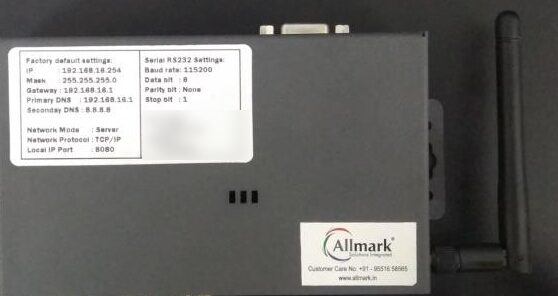
Puts an RS-232 barcode scanner, barcode printer, POS receipt printer, weighing scale or PLC on your Ethernet or Wi-Fi network. The AS2EW runs on 230 V AC mains.
See the AS2EW specificationsConverter or a serial cable? AS2EW user guide (PDF) Ethernet into Virtual HID app
Jobs it does
Each job below is one RS-232 device on one converter. Tell us the device and its serial settings, and we set the converter up for it.
The converter sends the scanner's data to an IP address and port, where your software or our Windows app picks it up. The scanner keeps its own settings.
Consider: Ethernet into Virtual HID app
The barcode printer or POS receipt printer keeps its own settings and receives its data over Ethernet or Wi-Fi instead of a serial cable.
Consider: Barcode printers, POS receipt printers
For example an electronic weighing scale, a PLC or an RFID reader with an RS-232 port. The converter is set to the device's own baud rate, data bits, parity and stop bits (see the serial settings in the specifications), so the device needs no change.
A serial cable ties the device to the one PC it plugs into. With the converter, software on your network opens its IP address and port, wired or over Wi-Fi in client, access point or router mode.
Consider: Converter or a serial cable?
Why the AS2EW
Our serial to Ethernet / Wi-Fi converter links an RS-232 device to your Ethernet or Wi-Fi network. The scanner, printer, weighing scale or PLC keeps its own settings. It sends and receives its data over the network instead of a serial cable.
One converter links RS-232 serial to Ethernet and RS-232 serial to Wi-Fi, so the same unit works on a wired or a wireless network.
The serial device needs no change to its configuration: data passes both ways between its RS-232 port and the Ethernet or Wi-Fi network.
Baud rates from 1,200 to 500,000 bps, 5 to 8 data bits, none, even, odd, space or mark parity, 1, 1.5 or 2 stop bits, and XON/XOFF flow control.
On request, pin 9 of the RS-232 port supplies +5 V DC to the connected device, such as a scanner.
Configure it with AT+ commands over the serial port or from its web page. A Windows tool configures the converter and finds it on your network.
135 × 83 × 34 mm (160 mm long with the mounting ears) and 340 g, rated to operate from -20 °C to 70 °C at 10% to 90% humidity, non-condensing.
Used in
Compare
| Feature | Serial to Ethernet / Wi-Fi Converter AS2EW | RS-232 serial cable |
|---|---|---|
| Connects the device to | Your Ethernet or Wi-Fi network | One PC, by cable |
| Device settings | Unchanged | Unchanged |
| Read by | Software that opens the converter's IP address and port, such as our Virtual HID app on a Windows PC | The PC the cable plugs into |
| Best for | Devices that must be read over the network | One device beside one PC |
Not sure which one fits? Tell us how you will use it and we will recommend a model.
For buyers in India
These are the points buyers in India ask us about the Serial to Ethernet / Wi-Fi Converter AS2EW. Mention the ones that apply to you when you request a quote.
The AS2EW runs on 230 V AC mains. Plan a mains socket next to the scanner, scale or PLC it connects to before installation.
Note the baud rate, data bits, parity and stop bits your scanner, scale or PLC uses. Tell us the device and its serial settings, and we confirm the model and its setup in your quotation.
Reading scans into a Windows PC? Our Ethernet into Virtual HID app takes the data the converter sends to an IP address and port and types it into Notepad or your billing software as keyboard entry.
Specifications
| General | |
|---|---|
| Model | AS2EW: 1-port RS-232 device server, 230 V AC input, drawing at most 400 mA |
| Connects | RS-232 serial to Ethernet and RS-232 serial to Wi-Fi, in one unit |
| Serial | |
| Serial port | 1 RS-232 port with a DE9 male and a DE9 female connector (TXD, RXD, GND); pin 9 can supply +5 V DC to the connected device, such as a scanner, on request |
| Serial settings | Baud rates from 1,200 to 500,000 bps (default 115,200, 8 data bits, no parity, 1 stop bit); 5 to 8 data bits; 1, 1.5 or 2 stop bits; none, even, odd, space or mark parity; XON/XOFF flow control |
| Ethernet | |
| Ethernet | 1 data (WAN) port and 1 configuration (LAN) port, 10/100 Mbps, RJ45; more than 20 TCP and 20 UDP connections |
| Wi-Fi | |
| Wi-Fi | 2.4 GHz, 802.11b/g/n, up to 150 Mbps on 802.11n; client, access point or router mode; WDS bridge; MAC address filtering; onboard or external antenna |
| Wi-Fi security | WEP (64, 128 and 152-bit), TKIP, AES, WPA-PSK, WPA2-PSK |
| Setup and network protocols | |
| Network protocols | PPPoE, TCP, UDP, DDNS, DHCP, DNS, HTTP |
| Setup | AT+ commands, over the serial port or a web page; Windows tool to configure the converter and find it on your network |
| Physical and environment | |
| Housing, size, weight | Metal; 135 × 83 × 34 mm (160 mm long with the mounting ears); 340 g |
| Operating range | -20 °C to 70 °C; 10% to 90% humidity, non-condensing |
| Used with | Barcode scanners, barcode printers, POS receipt printers, electronic weighing scales, PLCs, RFID readers, building automation |
| Warranty | |
| Warranty | Covered by the manufacturer's warranty: 1 year. |
Ask for the external antenna in the same quotation as the converter.
Allmark's own figures, from our Serial to Ethernet / Wi-Fi Converter user guide and product video, last checked 17 October 2026. Makers can change specifications without notice; we confirm the exact model and configuration in your written quotation. About our product information
More detail
Serial to Ethernet / Wi-Fi converter: put an RS-232 scanner, printer or scale on your network.
Downloads
Price
We quote each order in writing. These are the points that change the quotation; share them with your requirement and budget.
| What changes the price | Why it matters |
|---|---|
| Quantity | One converter for one device, or one for each scanner, printer, scale or PLC across a site. |
| External Wi-Fi antenna | The only optional accessory; ask for it in the same quotation as the converter. |
| Setup and training | Setting the converter to your device and network at your site, if you want it. |
| Delivery location and GST | Where the converters go and the tax invoice details. |
Questions buyers ask
The Serial to Ethernet / Wi-Fi Converter AS2EW price depends on the options and accessories you add and the quantity. Ask our team for today's competitive price: share your requirement and budget, and we will help you choose the right configuration and send a written quotation with current pricing and delivery time.
No. The device keeps its own settings, and the converter passes data both ways between its RS-232 port and the network. The converter is set to match the device: 1,200 to 500,000 bps, 5 to 8 data bits, none, even, odd, space or mark parity, and 1, 1.5 or 2 stop bits.
The AS2EW runs on 230 V AC mains and draws at most 400 mA. Plan a mains socket next to the device it connects to.
Yes, both in one unit. It has 1 data (WAN) and 1 configuration (LAN) RJ45 port at 10/100 Mbps, and 2.4 GHz 802.11b/g/n Wi-Fi in client, access point or router mode, with WEP, WPA-PSK and WPA2-PSK security.
The converter sends the scanner's data to an IP address and port. Our Ethernet into Virtual HID app on the Windows PC takes that data and types it into Notepad or your billing software as keyboard entry.
Yes, on request: pin 9 of its RS-232 port supplies +5 V DC to the connected device, such as a scanner. Name the scanner model when you ask for a quote.
Yes. We install the converter at your site, set it to match your device's serial settings and your network, and train your team. Tell us the device and its serial settings when you ask for a quote, and we include the setup in the quotation.
Call or WhatsApp us with the device and what changed. We go through the scanner or printer settings and the converter's serial and network settings with you.
Send how you will use it and the software it must work with; we reply with a written quotation.
We deliver across India.