Small enough to fit inside a machine
The PE200 mechanism measures 122 mm wide, 65 mm long and 65 mm high, and weighs under 0.5 kg without media, rewinder or control board. Four bores in the bottom frame fix it to your supporting structure.

Godex · Label print engine (print mechanism)
A 2-inch direct thermal print mechanism in a steel frame, with a separate control board, for machine builders who fit label or ticket printing inside a label applicator, a ticket kiosk or another self-service labelling system.
Godex PE200 price in India: on written quotation. Share the model, quantity and city; we reply within one working day (Monday to Saturday, 9:30 AM to 6:30 PM).
Covered by the manufacturer's warranty. The warranty period, terms and conditions are as declared by Godex.
Why the PE200
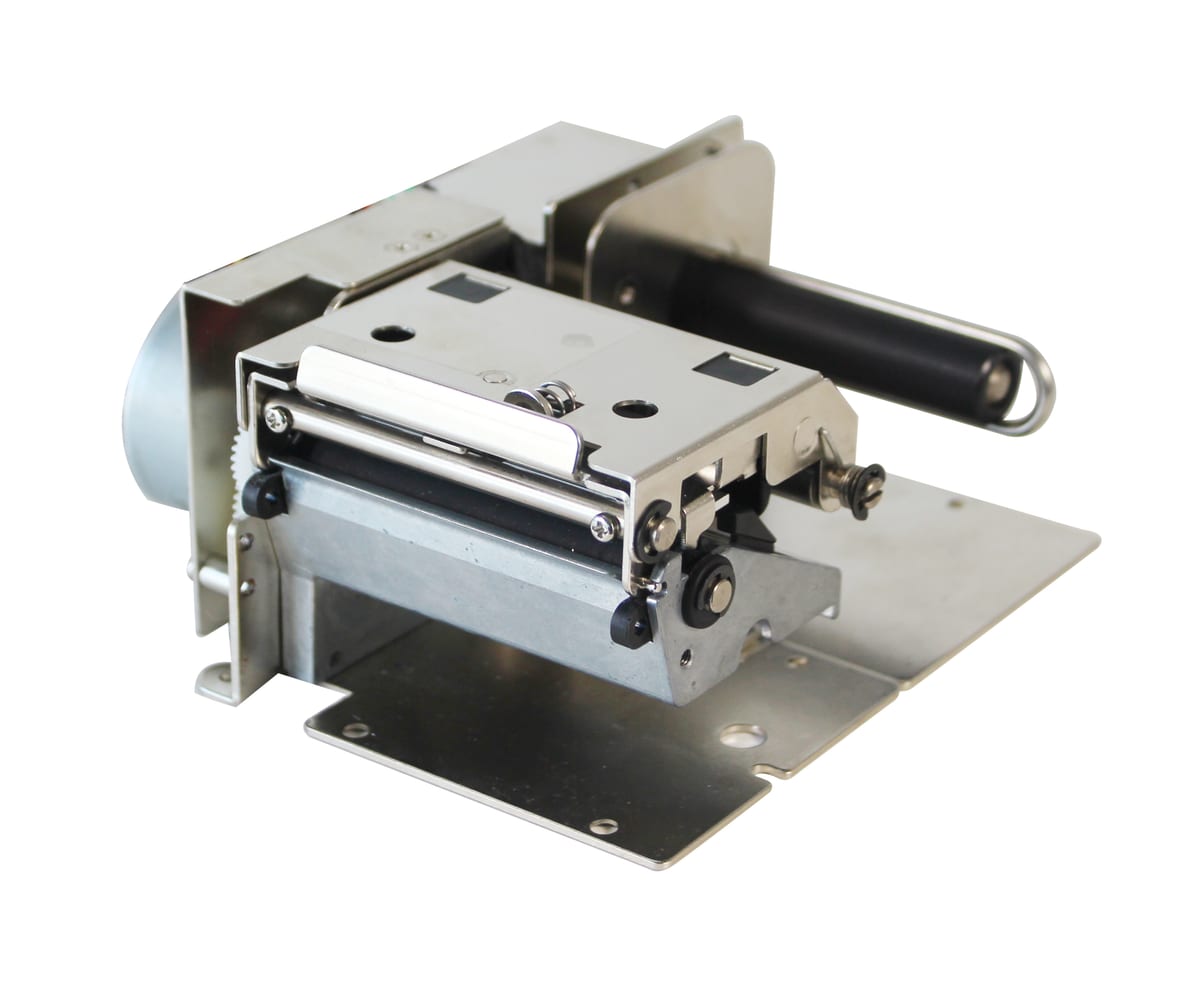
The PE200 is not a desktop printer in a case. Godex sells it as a print mechanism: the print head, platen, motor and media path in a steel frame, plus a separate control board with the ports. You mount it inside your own enclosure, such as a label applicator, a ticket kiosk or another self-service labelling system, the uses Godex names. Godex makes the 2-inch mechanism in two resolutions: the PE200 at 203 dpi and the PE230 at 300 dpi.
The PE200 mechanism measures 122 mm wide, 65 mm long and 65 mm high, and weighs under 0.5 kg without media, rewinder or control board. Four bores in the bottom frame fix it to your supporting structure.
The PE200 prints up to 6 ips (152 mm/s) at 203 dpi over a 54 mm print width. The PE230 prints up to 4 ips (102 mm/s) at 300 dpi over 56.9 mm, for smaller text and 2D codes. Godex notes that top speed and minimum print height depend on the label material.
The control board has a 32-bit RISC processor, 4 MB flash and 16 MB SDRAM, and connects by USB 2.0 (Type B), RS-232 serial (DB-9) and 10/100 Ethernet (RJ-45). It runs on 24 V and understands Godex's EZPL and GEPL and the Zebra-style GZPL language, switching between them on its own.
Godex offers a standard cutter, a linerless cutter, a rewinder module, and a label taken sensor with rewinder. The linerless version prints on labels without a backing paper; Godex says it cuts waste and fits more media on a roll. Choose the modules when you design the machine, so the frame and enclosure leave room for them.
The print head lifts on a release latch for cleaning, and the media roller has its own release knob. A FEED button with a two-colour LED handles label calibration and a self-test print, so a technician can check the module without a computer.
Used in
For buyers in India
These are the points buyers in India ask us about the PE200. Mention the ones that apply to you when you request a quote.
In a ticket kiosk or a self-service labelling system the printer sits inside the cabinet, not on top of it. The PE200 takes media 25.4 to 60 mm wide, so a 50 mm ticket or label fits with room for the guides. With a 3 mm gap, a 25 mm long label uses 28 mm of media: about 0.18 s at 6 ips (152 mm/s), or near 19,500 labels an hour of pure print time at 203 dpi.
The mechanism takes rolls up to 68 mm across, on a 25.4 mm or 38.1 mm core. Even at the thickest media Godex allows (0.17 mm), a full 68 mm roll on a 1-inch core holds about 18 m, some 650 labels of 25 mm with a 3 mm gap; thinner stock holds more. Where the machine prints often, either make the roll easy to reach or feed it from a larger external supply in your machine design.
Godex ships the mechanism and control board without a case and states that, in this form, they may not meet FCC, EMC and EMI standards. The board needs a 24 V supply. Your finished machine needs its own enclosure, a 24 V power supply sized for it, and a design that keeps humidity and dust away from the print head.
Godex rates the module for 5 °C to 40 °C and 30-85% humidity, non-condensing, and a closed kiosk in the sun runs hotter than the air around it. Ventilate or cool the cabinet, and use direct thermal media rated for the heat your site sees.
Godex lists EAN-13, EAN-128, ITF-14 and GS1 DataBar, plus QR, Micro QR, Data Matrix, PDF417 and GS1 Composite. Small 2D codes print more cleanly on the 300 dpi PE230.
Specifications
| General | |
|---|---|
| Models | PE200 (203 dpi) · PE230 (300 dpi), both 2-inch |
| Supplied as | Print mechanism and separate control board (PCBA), without enclosure |
| Frame | Steel frame; four bores in the bottom frame for mounting |
| Processor (control board) | 32-bit RISC CPU |
| Memory (control board) | 4 MB flash, 16 MB SDRAM |
| Sensor | Fixed transmissive sensor, left aligned |
| Controls | FEED button; LED green (ready) and red flashing (error); label size calibration and self-test print |
| Printing | |
| Print method | Direct thermal |
| Resolution | PE200: 203 dpi (8 dots/mm) · PE230: 300 dpi (12 dots/mm) |
| Max. print speed | PE200: 152 mm/s (6 ips) · PE230: 102 mm/s (4 ips) |
| Max. print width | PE200: 54 mm (2.12 in) · PE230: 56.9 mm (2.24 in) |
| Print length | PE200: 10 mm (0.39 in) to 1,727 mm (68 in) · PE230: 4 mm (0.16 in) to 762 mm (30 in) |
| Printer language | EZPL, GEPL, GZPL with automatic switching; GDPL optional |
| Barcodes | 1D (Code 39, Code 93, Code 128, EAN-8 / EAN-13, EAN-128, ITF-14, UPC-A / UPC-E, GS1 DataBar, Codabar, HIBC, ISBT-128 and others) and 2D (QR, Micro QR, Data Matrix, PDF417, Micro PDF417, MaxiCode, Aztec, Code 49, Codablock F, TLC 39, GS1 Composite) |
| Fonts | Resident bitmap fonts 6, 8, 10, 12, 14, 18, 24, 30, 16×26 and OCR A and B, expandable 8 times; TrueType fonts (bold, italic, underline); rotation 0°, 90°, 180°, 270°; downloadable bitmap, Asian and TrueType fonts |
| Code pages | Codepage 437, 737, 850, 851, 852, 855, 857, 860, 861, 862, 863, 865, 866, 869; Windows 1250 to 1255 and 1257; Unicode UTF-8, UTF-16BE, UTF-16LE |
| Graphics | BMP and PCX resident; other formats downloadable from the software |
| Media | |
| Media types | Continuous form and gap labels; label length by auto sensing or programming |
| Media width | 25.4-60 mm (1-2.36 in) |
| Media thickness | 0.05-0.17 mm (0.002-0.0067 in) |
| Label roll | Up to 68 mm (2.67 in) O.D.; core 25.4 mm (1 in) or 38.1 mm (1.5 in) |
| Rewound liner roll | Up to 66 mm O.D. |
| Connectivity | |
| Standard (control board) | USB 2.0 (Type B), RS-232 serial (DB-9), Ethernet 10/100 Mbps (RJ-45) |
| Serial default | 9600 baud, no parity, 8 data bits, 1 stop bit; XON/XOFF and RTS/CTS |
| SDK | Win CE, .NET, Windows Vista to Windows 10, Android, Mac, iOS |
| Physical and environment | |
| Mechanism dimensions | PE200: 122 mm width, 65 mm length, 65 mm height (4.80 × 2.56 × 2.56 in) |
| Mechanism weight | Under 0.5 kg, excluding consumables, internal rewinder and control board |
| Power | 24 V operating voltage (control board and motor); print head logic 3.3 V, printing voltage 24 V |
| Operating environment | 5 °C to 40 °C (41 °F to 104 °F), 30-85% humidity, non-condensing |
| Storage environment | -20 °C to 50 °C (-4 °F to 122 °F), 10-90% humidity, non-condensing |
| Compliance note (Godex) | Shipped without enclosure; Godex states it may not comply with FCC, EMC and EMI standards in this form |
| Warranty | |
| Warranty | Covered by the manufacturer's warranty. The warranty period, terms and conditions are as declared by Godex. |
Name the modules your machine needs (cutter, linerless cutter, rewinder, label taken sensor) and the resolution in the same quotation request.
Specifications from Godex's published documents, last checked 11 October 2026. Makers can change specifications without notice. About our product information
Compare
| Feature | Godex PE200 / PE230 | Godex G500 | Godex ZX1200i+ Series |
|---|---|---|---|
| Type | Print engine, no case | Desktop printer | Industrial printer |
| Print method | Direct thermal | Thermal transfer and direct thermal | Thermal transfer and direct thermal |
| Resolution | 203 / 300 dpi | 203 dpi | 203 / 300 / 600 dpi |
| Max. speed | 6 / 4 ips | 5 ips | 10 / 7 / 4 ips |
| Max. print width | 54 / 56.9 mm | 108 mm | 104 mm |
| Standard ports | USB, RS-232, Ethernet | USB 2.0; RS-232 and Ethernet on some builds | USB, RS-232, Ethernet, 3 × USB host |
| Best for | Printing built into a kiosk, applicator or machine | General labels where 203 dpi is enough | 4-inch labels at high volume on a line |
If your job differs from what the PE200 is built for, these Godex models may fit it better:
Not sure which one fits? Tell us how you will use it and we will recommend a model.
Downloads
Questions buyers ask
The PE200 price depends on the resolution you choose (203 or 300 dpi), the options you add and the quantity. We can quote the labels with it. We do not publish prices: share the model, quantity and city, and we send a written quotation with current pricing and delivery time, replying within one working day.
No. Godex sells the PE200 as a print mechanism with a separate control board and no case. It is meant for machine builders and integrators who fit printing inside their own label applicator, ticket kiosk or self-service labelling system. If you need a ready-made printer for a desk or counter, look at a Godex desktop model such as the G500 instead.
Choose by label detail. The PE200 prints at 203 dpi and up to 6 ips (152 mm/s) over 54 mm, which suits tickets and simple barcodes. The PE230 prints at 300 dpi and up to 4 ips (102 mm/s) over 56.9 mm, for small text and small QR or Data Matrix codes. Allmark quotes Godex print mechanisms together with labels, and invoices with GST. With the quote request, send a sample of your label or ticket, the resolution (203 or 300 dpi), the modules you need (cutter, linerless cutter, rewinder, label taken sensor), your label size and the number of machines you plan to build.
No. The PE200 is direct thermal only, so it needs heat-sensitive labels or paper and no ribbon. That keeps the machine simple, with one consumable to refill. Direct thermal prints are sensitive to heat and light, so for labels that must stay readable for a long time, ask us about thermal transfer printers instead.
Continuous paper or gap labels from 25.4 to 60 mm wide and 0.05 to 0.17 mm thick, on rolls up to 68 mm across with a 25.4 mm or 38.1 mm core. The sensor is a fixed transmissive (gap) sensor, left aligned, and Godex does not list black-mark media for this model. Send your label size with the quote request.
The control board has USB 2.0, RS-232 serial and 10/100 Ethernet. It accepts Godex's EZPL and GEPL and the Zebra-style GZPL commands, switching between them on its own, and Godex offers SDKs for Windows, .NET, Win CE, Android, Mac and iOS. Allmark can help connect it to your software.
Godex gives 24 V as the operating voltage for the control board and the motor. The mechanism ships without a power supply, so the machine builder fits a 24 V supply of the right rating inside the enclosure, fed from the machine’s own mains supply. Ask for the power supply in the same quotation if you need one.
Yes. We install the PE200 at your site, connect it so your ERP, warehouse or billing software prints to it (our own warehouse management system included) and train the people who use it. Tell us the software when you ask for a quote, and we include the setup in the quotation.
Send your label size, how many labels you print a day and the software you print from; we reply with a written quotation.
Since 2014 · 2000+ customers · 75,000+ devices installed · On-site installation & training · Software & ERP integration