


Compact, with standard mounts
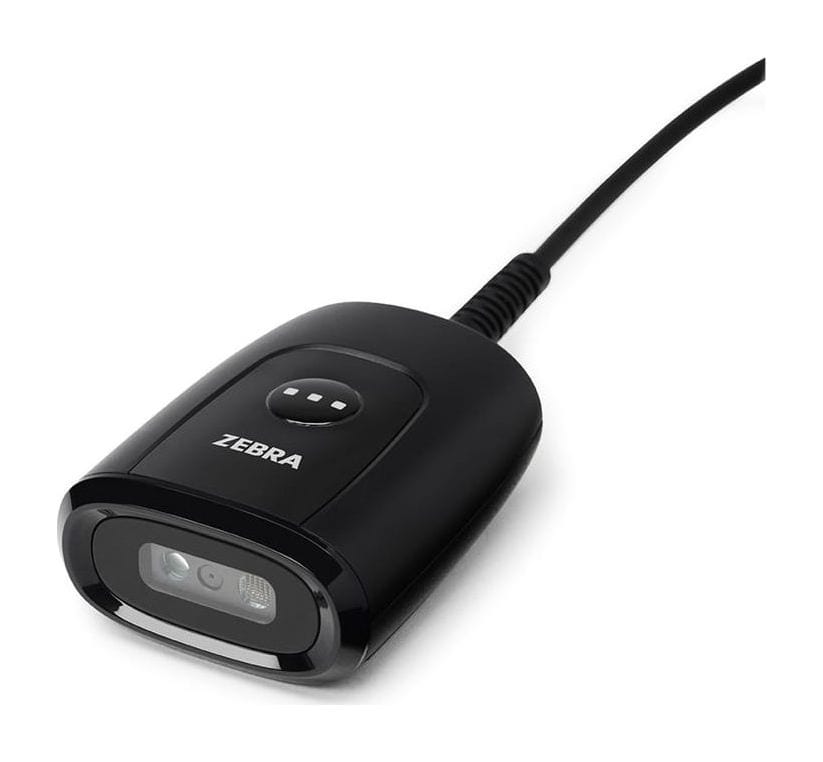
The scanner measures 3.0 × 5.6 × 7.2 cm and weighs 65.2 g. It has a standard 1/4-20 camera mount, and Zebra offers a gooseneck stand and a 3-in-1 mount for a PC display, a desk or a wall.

IIoT
Browse IIoT
Zebra · Fixed-mount barcode scanner
A palm-sized 1D/2D fixed-mount scanner for building into kiosks, self-service counters, access gates, lab instruments and packing stations.
DS55 price in India: ask our team for today's competitive price. Share your requirement and budget, and we will help you choose the right configuration and send a written quotation with current pricing and delivery time.
Covered by the manufacturer's warranty. The warranty period, terms and conditions are as declared by Zebra.
Already use one? Need service? Log a service call for the Zebra DS55
Why the DS55
The DS55 is Zebra's compact fixed-mount imager and its named successor to the DS457, which Zebra stopped selling on 29 December 2024. Zebra also offers a DS55 for Labs version.
The scanner measures 3.0 × 5.6 × 7.2 cm and weighs 65.2 g. It has a standard 1/4-20 camera mount, and Zebra offers a gooseneck stand and a 3-in-1 mount for a PC display, a desk or a wall.
A 48° × 30° field of view with full 360° roll tolerance and ±60° skew and pitch means users need not line up the code carefully. Swipe speed is up to 254 cm per second for a 13 mil UPC in optimised mode.
Minimum resolution is 3 mil for Code 39 and Code 128 and 5 mil for Data Matrix and QR, which suits small labels on tubes, vials and electronic parts. The DS55 for Labs version targets laboratory work.
Run it hands-free in presentation mode, or under host or trigger control for longer reach. In trigger mode a 13 mil UPC reads from 4.1 cm to 62.7 cm; in presentation mode, from 4.1 cm to 35.6 cm.
Besides 1D and 2D barcodes it reads OCR-A, OCR-B and MICR, and captures images at 200 PPI on a 15.2 × 9.5 cm document held at 17.8 cm, saved as Bitmap, JPEG or TIFF.
Set it up with 123Scan, manage it remotely with Scanner Management Service, and build it into your own application with the Scanner SDK. Allmark can integrate it with your kiosk, billing or ERP software.
Used in
For buyers in India
These are the points buyers in India ask us about the DS55. Mention the ones that apply to you when you request a quote.
The DS55 suits kiosks where visitors show a QR e-ticket, booking or visitor pass on a phone. Zebra's DS55 reference guide has a Mobile Phone/Display Mode, on by default for hands-free reading. Set the kiosk's reading distance from trials with your own tickets: Zebra's 2.3-35.6 cm presentation range for a 20 mil QR is for printed codes, and it gives no figure for screens.
One DS55 in a price-check kiosk or a medicine counter reads both barcodes and QR codes: UPC/EAN, QR and Data Matrix, with 2D codes down to 5 mil. EAN-13 barcodes issued by GS1 India start with 890.
Check the temperature inside the kiosk enclosure, not just the weather: a closed kiosk standing in the sun can run hotter than the air around it. The DS55 works from -20 °C to 50 °C and is sealed to IP54 (dust-protected, protected against splashing water), so mount it behind the kiosk window or under a hood outdoors.
Power the DS55 from the kiosk PC's USB port. It draws 360 mA at 5 V in presentation mode, about 1.8 W, which is within the 500 mA a standard USB 2.0 port supplies. Zebra's DS55 guide lists external 5 V supplies only with US, EU/UK and China plugs. If you connect over RS232 and the host does not supply 5 V, ask about an India power option when you request a quote.
Specifications
| General | |
|---|---|
| Versions | DS55; DS55 for Labs |
| Colours | Alpine White, Midnight Black (DS55 for Labs: Alpine White) |
| Input voltage | 4.75-5.25 VDC, host powered or external power supply |
| Operating current | Presentation mode 360 mA; trigger mode 350 mA (RMS typical) |
| Standby current | Presentation mode 185 mA; trigger mode 155 mA (RMS typical) |
| User indicators | Good-decode LEDs, adjustable speaker |
| Scanning | |
| Image sensor | 1280 × 800 pixels |
| Field of view | 48° H × 30° V nominal |
| Aimer | Circular 525 nm green LED |
| Illumination | One warm-white LED |
| Swipe speed | Up to 254 cm/s for 13 mil UPC (optimised mode) |
| Angles | Skew ±60°, pitch ±60°, roll 0-360° |
| Minimum resolution | Code 39 and Code 128: 3.0 mil; Data Matrix and QR: 5.0 mil |
| Minimum print contrast | 15% reflective difference |
| 1D | Code 39, Code 128, Code 93, Codabar/NW7, Code 11, MSI Plessey, UPC/EAN, I 2 of 5, Korean 3 of 5, GS1 DataBar, Base 32 (Italian Pharma) |
| 2D | PDF417, MicroPDF417, Composite, TLC-39, Aztec, Data Matrix, MaxiCode, QR, Micro QR, Han Xin, Postal, SecurPharm |
| OCR | OCR-A, OCR-B, MICR, US currency |
| Range: Code 39 3 mil | 7.1 cm to 14.2 cm (trigger and presentation) |
| Range: Code 39 20 mil | Trigger 4.1 cm to 91.2 cm; presentation 5.1 cm to 45.7 cm |
| Range: Code 128 5 mil | Trigger 5.3 cm to 24.4 cm; presentation 5.3 cm to 21.6 cm |
| Range: UPC 13 mil (100%) | Trigger 4.1 cm to 62.7 cm; presentation 4.1 cm to 35.6 cm |
| Range: PDF417 6.7 mil | Trigger 5.8 cm to 25.1 cm; presentation 5.8 cm to 22.6 cm |
| Range: Data Matrix 10 mil | Trigger 4.8 cm to 27.4 cm; presentation 4.8 cm to 24.1 cm |
| Range: QR Code 20 mil | Trigger 2.3 cm to 43.9 cm; presentation 2.3 cm to 35.6 cm |
| Image capture | Bitmap, JPEG, TIFF; 200 PPI on a 15.2 × 9.5 cm document at 17.8 cm |
| Connectivity | |
| Host interfaces | USB, RS232 |
| USB certification | Yes |
| Cables | 0.6 m and 2.1 m, straight and right-angle connectors |
| Physical and environment | |
| Dimensions | 3.0 cm H × 5.6 cm W × 7.2 cm D |
| Weight | 65.2 g |
| Mounting | Standard 1/4-20 camera mount |
| Operating temperature | -20 °C to 50 °C |
| Storage temperature | -40 °C to 70 °C |
| Humidity | 5-95% RH, non-condensing |
| Sealing | IP54 |
| Drops | Multiple 1.5 m drops to concrete |
| ESD | ±15 kV air, ±8 kV direct, ±8 kV indirect (EN61000-4-2) |
| Ambient light | 0-107,600 lux |
| Software | |
| Utilities | 123Scan, Scanner SDK, Scanner Management Service (SMS) |
| Zebra DNA | Supports Advanced Data Formatting, Intelligent Document Capture, IoT Connector, Label Parse+, Multi-Code Data Formatting, PRZM Intelligent Imaging, Remote Diagnostics, Remote Management, UDI Scan+ |
| Warranty | |
| Warranty | Covered by the manufacturer's warranty. The warranty period, terms and conditions are as declared by Zebra. |
Ask for the stand, mount and the right cable length in the same quotation.
Specifications from Zebra's published documents, last checked 13 October 2026. Makers can change specifications without notice; we confirm the exact model and configuration in your written quotation. About our product information
Compare
| Feature | Zebra DS55 | Zebra DS457 (SR) |
|---|---|---|
| Image sensor | 1280 × 800 | 752 × 480 |
| Field of view | 48° × 30° | 39.6° × 25.7° |
| Weight | 65.2 g | 111 g |
| Range: UPC 13 mil | Trigger 4.1-62.7 cm; presentation 4.1-35.6 cm | 3.8 cm to 38.9 cm |
| Interface | USB, RS232 | USB and TTL-level RS232 (9-pin D-sub) |
| Sealing | IP54 | IP54 |
| Best for | New kiosk, counter and lab installations | Units already in use; no longer sold since December 2024 |
If your job differs from what the DS55 is built for, this Zebra model may fit it better:
Not sure which one fits? Tell us how you will use it and we will recommend a model.
Downloads
Questions buyers ask
The DS55 price depends on the cable or accessories you need and the quantity. Ask our team for today's competitive price: share your requirement and budget, and we will help you choose the right configuration and send a written quotation with current pricing and delivery time.
Zebra stopped selling the DS457 on 29 December 2024 and names the DS55 as its successor. Zebra support for the DS457 continues until 27 February 2030. The DS55 has a higher-resolution 1280 × 800 sensor, a wider field of view and weighs 65.2 g instead of 111 g. Zebra says the DS55 has similar dimensions and matching mounting-hole positions, but the DS457 used a 9-pin D-sub connector, so plan new cables when you replace one.
Yes, that is what it is designed for. It measures 3.0 × 5.6 × 7.2 cm, has a standard 1/4-20 camera mount and runs on 5 V from the host or an external supply. Zebra's Scanner SDK lets your developers control it from your own application. Share your enclosure drawing and reading distance when you ask for a quote.
Yes. The DS55 decodes QR, Data Matrix, PDF417, Aztec and other 2D codes, and Zebra's reference guide includes a Mobile Phone/Display Mode for codes on phones and screens. Zebra publishes ranges only for printed codes, so try it with your own tickets or app screens before a large rollout.
It is the version of the DS55 that Zebra offers for laboratories, pharmacies and patient intake. Its spec sheet lists the same scanning specs as the DS55, in Alpine White, with a wipeable housing that has no exposed openings. Zebra adds parsing tools such as Blood Bag Parse+ for blood bag labels and UDI Scan+ for medical device labels. It reads Code 39 and Code 128 down to 3 mil, which suits small labels on sample tubes. Mention your instrument or workstation when you ask for a quote.
Yes. We install the DS55 at your site, set it to send data the way your ERP, warehouse or billing software expects (our own warehouse management system included) and train your team. Tell us the software when you ask for a quote, and we include the setup in the quotation.
Send what you scan, where you scan it and the software it feeds; we reply with a written quotation.
Since 2014 · 2000+ customers · 75,000+ devices installed · On-site installation & training · Software & ERP integration