


Paper and screens without switching
The current FR4080 (hardware version 2.0) reads printed labels and codes on phone screens in the same mode, so staff never switch modes. The top mode button of earlier units has been removed.

IIoT
Browse IIoT
Newland · Desktop (hands-free) 1D/2D barcode scanner
A corded hands-free desktop scanner that reads 1D and 2D codes on paper and phone screens, for billing counters in supermarkets, pharmacies and retail stores.
FR4080 price in India: ask our team for today's competitive price. Share your requirement and budget, and we will help you choose the right configuration and send a written quotation with current pricing and delivery time.
Covered by the manufacturer's warranty. The warranty period, terms and conditions are as declared by Newland.
Already use one? Need service? Log a service call for the Newland FR4080
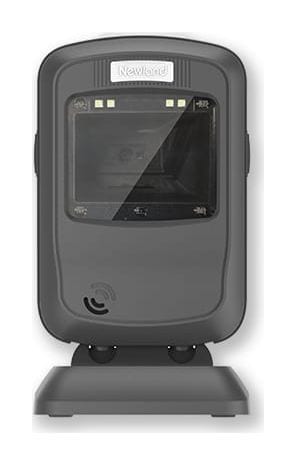
Why the FR4080
The FR4080 is a Newland desktop scanner. It stands on the counter, senses a code held in front of its window with an infrared sensor and reads it without a trigger press.
The current FR4080 (hardware version 2.0) reads printed labels and codes on phone screens in the same mode, so staff never switch modes. The top mode button of earlier units has been removed.
An infrared sensor detects an item presented to the window and starts a read. Staff hold the product or phone in front of the window; there is no trigger to press.
Newland rates it for codes down to 3 mil, an EAN-13 (13 mil) from 10 to 280 mm and a 15 mil QR code from 10 to 190 mm, with a 51° × 32° field of view.
An RJ45 data port on the scanner takes either a USB cable or an RS-232 cable. Over USB it is powered by the PC or POS terminal and draws 275 mA (typical) at 5 V.
IP52 sealing against dust and dripping water, multiple 1.2 m drops to concrete (one per side, six sides), and an operating range of -20 °C to 60 °C.
Newland's EasySet tool sets prefixes, suffixes and data formats. Newland also lists JPOS and OPOS drivers and USB virtual-COM drivers for POS software.
Used in
For buyers in India
These are the points buyers in India ask us about the FR4080. Mention the ones that apply to you when you request a quote.
Hold a GST e-invoice roughly 13-15 cm from the FR4080's window and the whole IRN QR code is in its 32° vertical view. That is inside the 10-190 mm range Newland gives for a 15 mil QR code.
Cashiers can pass packets across the FR4080's window at different distances without lining them up. Newland rates it to read a standard-size EAN-13, with 13 mil (0.33 mm) bars, from 10 mm to 280 mm in front of the window. GS1 India issues the EAN-13 numbers that start with 890.
Customers can hold e-coupons, loyalty codes and order codes on their phones to the FR4080's window; Newland's version 2.0 reads screen codes without a mode change. The FR4080 can also read the text in a UPI QR, for example to check a printed QR. Payment happens in the customer's UPI app, not in the scanner.
If you connect the FR4080 by RS-232, ask for a power adapter in the same quotation. Over USB it takes 275 mA (typical) at 5 V, about 55% of the 500 mA a USB 2.0 port supplies, so no adapter is needed. The RS-232 cable has a power jack and needs a power adapter.
Newland rates the FR4080 to work from -20 °C to 60 °C and in 5-95% humidity, non-condensing. In humid coastal towns the risk is condensation: avoid moving it straight out of an air-conditioned store into a hot shopfront.
Specifications
| General | |
|---|---|
| Model | NLS-FR4080 desktop scanner (hardware version 2.0) |
| Decode capability | 1D, 2D |
| Connectivity | Corded |
| Trigger | IR sensor (reads codes presented to the window) |
| Notification | Beep, LED |
| Certifications | FCC Part 15 Class B, CE EMC Class B, RoHS |
| Scanning | |
| Image sensor | 1280 × 800 CMOS |
| Illumination | White LED |
| 2D symbologies | PDF417, Data Matrix, QR Code, Micro QR Code, Aztec and others |
| 1D symbologies | EAN-13, EAN-8, UPC-A, UPC-E, ISSN, ISBN, Codabar, Code 128, Code 93, ITF-6, ITF-14, Interleaved 2 of 5, Industrial 25, Standard 25, Matrix 2 of 5, GS1 DataBar, Code 39, Code 11, MSI-Plessey, Plessey and others |
| Resolution | ≥ 3 mil |
| Depth of field, EAN-13 13 mil | 10-280 mm |
| Depth of field, QR Code 15 mil | 10-190 mm |
| Field of view | 51° horizontal, 32° vertical |
| Scan angles | Pitch ±50°, roll 360°, skew ±50° |
| Minimum symbol contrast | 25% |
| Test conditions | 23 °C, 300 lux incandescent light, sample barcodes printed by Newland |
| Connectivity | |
| Interfaces | USB, RS-232 (RJ45 data port on the scanner) |
| USB modes | USB HID keyboard, USB CDC (virtual COM), USB HID-POS |
| Operating voltage | 5 VDC ±5% |
| Current at 5 VDC | 275 mA operating (typical) |
| Rated power consumption | 1,375 mW (typical) |
| Power | From the host over USB; the RS-232 cable has a power jack for a power adapter |
| Physical and environment | |
| Dimensions | 83 mm (W) × 81 mm (D) × 148 mm (H) |
| Weight | 290 g |
| Sealing | IP52 |
| Drop | 1.2 m to concrete (six sides, one drop per side) |
| Operating temperature | -20 °C to 60 °C |
| Storage temperature | -40 °C to 70 °C |
| Humidity | 5-95%, non-condensing |
| ESD | ±14 kV air discharge, ±8 kV direct discharge |
| Software | |
| Configuration | Newland EasySet; programming barcodes; serial commands |
| Drivers | JPOS, OPOS, UFCOM driver, USB-COM driver |
| Warranty | |
| Warranty | Covered by the manufacturer's warranty. The warranty period, terms and conditions are as declared by Newland. |
Ask for the USB or RS-232 cable, and a power adapter if you use RS-232, in the same quotation.
Specifications from Newland's published documents, last checked 9 October 2026. Makers can change specifications without notice; we confirm the exact model and configuration in your written quotation. About our product information
Compare
| Feature | Newland FR4080 | Newland FR27 | Newland FR80 | Newland FR42-BT |
|---|---|---|---|---|
| Form | Desktop scanner, corded | Compact desktop scanner, window facing up, corded | On-counter scanner, corded | Desktop scanner, cordless (Bluetooth 5.0) |
| Image sensor | 1280 × 800 | 640 × 480 | 1280 × 1088 | 1080 × 1280 |
| Field of view | 51° H × 32° V | 68° H × 51° V | 42.4° H × 36° V | 62° H × 54° V |
| EAN-13 13 mil range | 10-280 mm | 20-105 mm | 0-140 mm | 10-130 mm |
| Interfaces | USB, RS-232 | USB | USB, RS-232 | Bluetooth 5.0; USB dongle |
| Sealing | IP52 | IP42 | IP52 | IP52 |
| Weight | 290 g | 120 g | 542-549 g without base, 678-681 g with base | 209 g |
| Operating temperature | -20 °C to 60 °C | -20 °C to 60 °C | -20 °C to 50 °C | -10 °C to 55 °C |
| Best for | Billing counters that need RS-232 or a longer reading range | Small counters where customers show codes on phones | Busy supermarket lanes with a large scan window | Counters that want no data cable to the PC |
If your job differs from what the FR4080 is built for, these Newland models may fit it better:
Not sure which one fits? Tell us how you will use it and we will recommend a model.
Downloads
Questions buyers ask
The FR4080 price depends on the cable or accessories you need and the quantity. Ask our team for today's competitive price: share your requirement and budget, and we will help you choose the right configuration and send a written quotation with current pricing and delivery time.
Yes. Newland's discontinued-products list shows the FR4060 ended on 16 July 2020 with the FR4080 as its replacement, and the HR1070 ended on 20 July 2021, also replaced by the FR4080. Tell us which cable and interface your FR4060 uses (USB or RS-232) when you ask for a quote, so the new scanner matches your billing system.
Yes. Newland states it reads paper barcodes and screen barcodes without switching.
Use USB for most PCs and POS terminals: the scanner is powered from the USB port and can work as a keyboard, a virtual COM port or HID-POS device. Use RS-232 for older billing machines with a serial port: that cable has a power jack and needs a separate 5 V power adapter. Name your billing system when you ask for a quote.
Usually, yes. In USB keyboard mode, scanned codes appear wherever the cursor is, as in most billing and ERP screens. It can also work as a virtual COM port or HID-POS device, and Newland lists JPOS and OPOS drivers. Older billing machines with only a serial port can use the RS-232 cable instead.
Both are Newland desktop scanners of a similar size. The FR4080 is corded, has a 1280 × 800 sensor, reads a 13 mil EAN-13 out to 280 mm and offers RS-232 as well as USB. The FR42-BT is cordless over Bluetooth 5.0 with a 2,000 mAh battery and a wider 62° × 54° view, but reads EAN-13 only out to 130 mm.
Yes. We install the FR4080 at your site, set it to send data the way your ERP, warehouse or billing software expects (our own warehouse management system included) and train your team. Tell us the software when you ask for a quote, and we include the setup in the quotation.
Send what you scan, where you scan it and the software it feeds; we reply with a written quotation.
Since 2014 · 2000+ customers · 75,000+ devices installed · On-site installation & training · Software & ERP integration